Welcome back to part two of our Forecasting & Demand blog series for DDI System’s Inform ERP! In our previous post, we explored the differences between Reorder Point (ROP) and Reorder Quantity (ROQ), diving into how Inform ERP calculates these values to streamline your inventory management.
Today, we’re excited to explore two more essential features that will help you maintain control over your stock levels: Critical Inventory and Projected Purchase Orders. Let’s jump right in!
A Deep Dive into Our Critical Inventory System
Both Critical Inventory and Forecasting are housed under Inform ERP’s Purchasing menu. Critical Inventory serves as a low-stock alert system, providing a report that highlights which items are critically low and in need of replenishment. You can generate this report for all warehouses or filter it down to specific locations based on your needs.
For example, if different buyers manage various product lines, they can filter the report by vendor, product line, price, or product number. This way, they can see only the items relevant to their role. Let’s take a look at the company GOODRICH, one of our vendors. As shown in the example report, we’re critically low on certain products. What does this mean? Essentially, it means the availability of the item has dropped below the calculated Reorder Point (ROP). In this case, we have only 2 units of a product in stock, while the system recommends that we reorder 61 units to avoid stockouts.
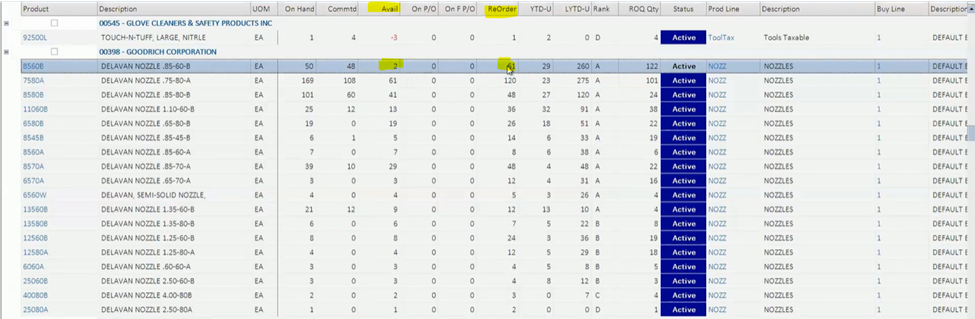
Over the years, we’ve enhanced this report to be even more useful. A newer column, Reorder Quantity (ROQ Qty), helps users not only see what needs reordering but also shows how much they should order based on system recommendations to help you avoid guesswork.
Moving from Critical Inventory to Projected Purchase Orders
One of the great features of Inform ERP is the ability to transition seamlessly from a Critical Inventory Report to a Projected Purchase Order (P/O). There are two ways to do this:
- Directly from the Critical Inventory Report:
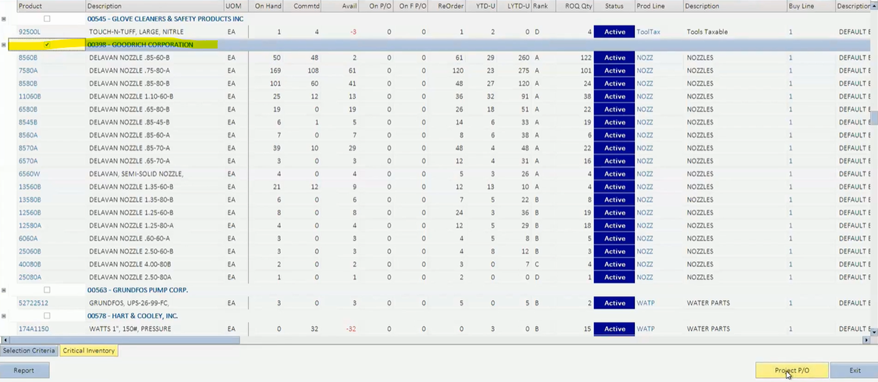
- Select your vendor (e.g., GOODRICH) and click Project PO in the bottom-right corner.
- The system will provide a list of recommended purchases, including both critical and non-critical items.
- From here, you can easily generate a purchase order.
- Via the Purchasing Menu:
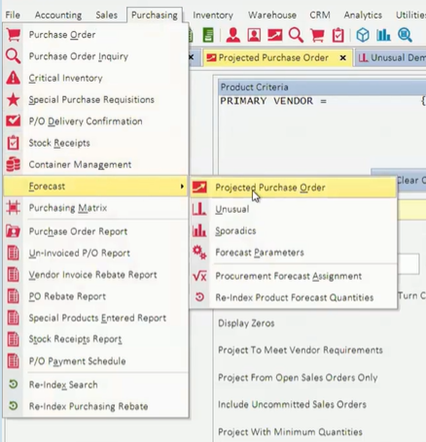
- Go to Purchasing > Forecast > Projected Purchase Order to run a stand-alone projection.
- This method offers flexibility and control if you want to forecast needs without starting from the Critical Inventory Report.
Walking Through a Projected Purchase Order
The Projected P/O screen within Inform ERP is a robust tool for planning purchases. For this example, we’ll focus on critical items, but you can configure it to display products based on open sales orders, all items, or any custom criteria.
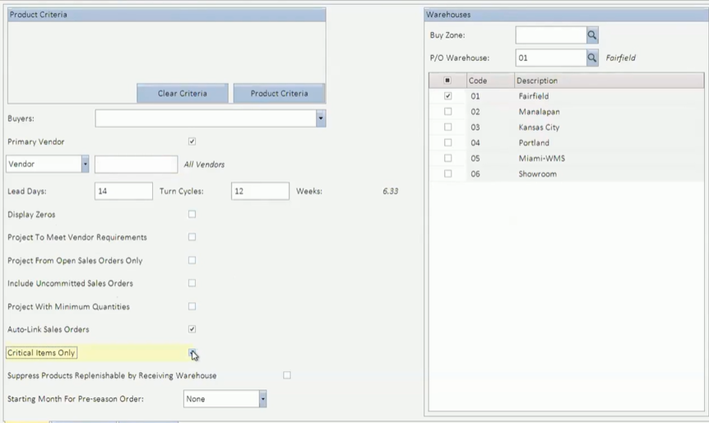
For companies with multiple warehouses, Inform ERP allows you to consolidate purchase orders. Simply check the boxes for the warehouses you want to include, and the system will create stock transfers for all selected locations.
One of the standout features of the Projected P/O screen is that it doesn’t require you to choose a vendor initially, pictured below. This is particularly useful if you’re still determining which vendor to buy from and want to get an overview of what you need. In our case, we’ll just hit the X in the top right corner to close the window.
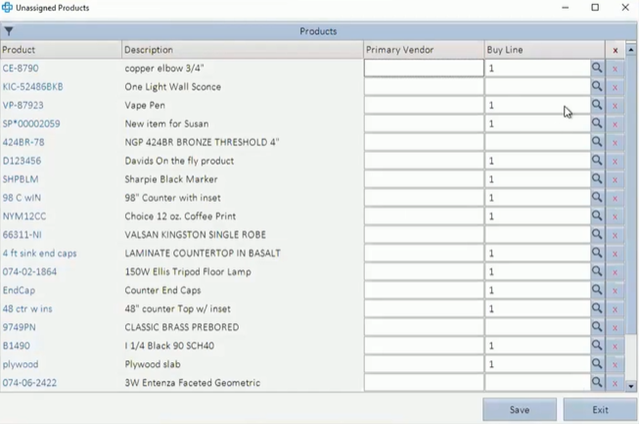
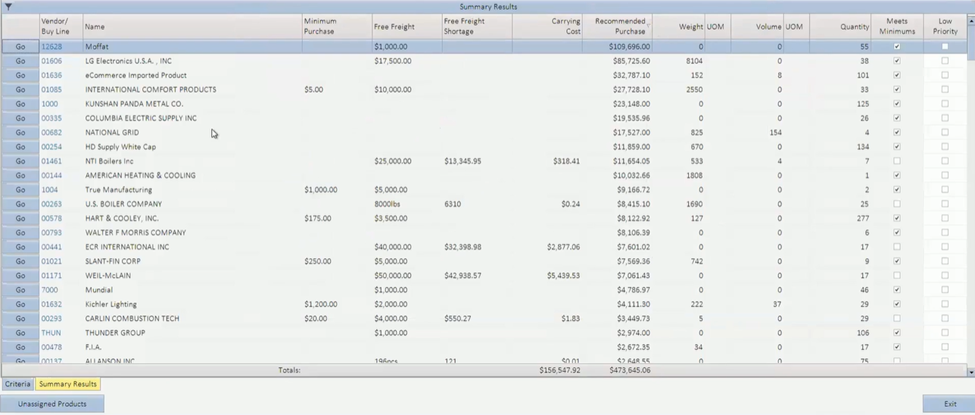
When running a projected purchase order, the system will display a report, showing products without linked vendors, helping you organize and assign vendors to those products for future orders. After sorting the necessary items and vendors, Inform ERP shows you the minimum amount for purchase, free freight requirements, and the recommended purchase amount.
Fine-Tuning Your Purchase Order Results
Once you’ve generated your projected purchase order, you’ll want to ensure that the recommended purchase amounts align with your actual needs. Inform ERP uses factors like lead time (how long it takes for the product to arrive) and projected turns (how often you sell through the product) to determine how much stock to order.
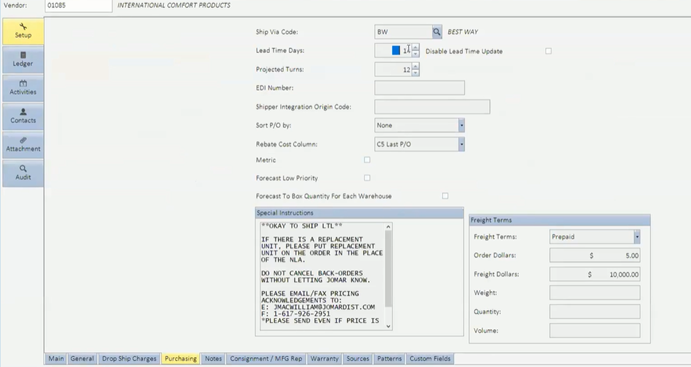
For example, if your lead time is 14 days and your product turns over every 4 weeks, the system will recommend purchasing enough stock to cover a little over 6 weeks of demand (2 weeks lead time + 4 weeks turnover).
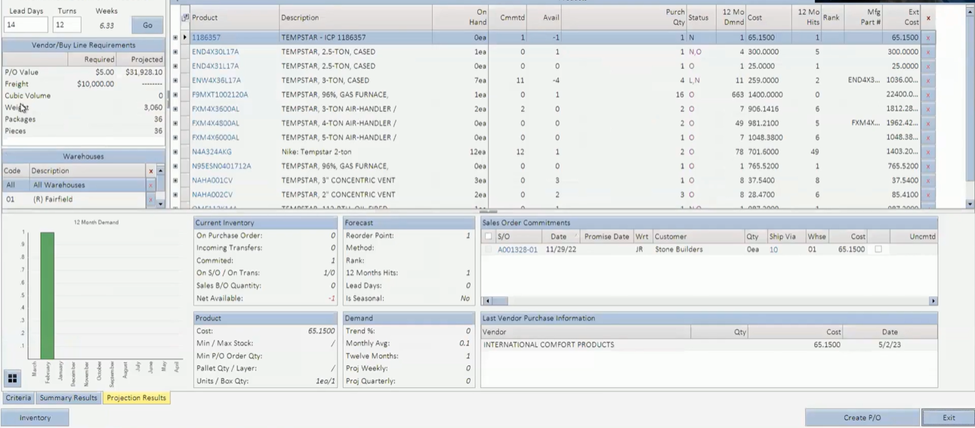
At this stage, you can further refine the order by adjusting the recommended quantities, viewing product-specific information, and checking details such as 12-month demand, backorders, and existing sales orders. If you’re purchasing from multiple vendors, Inform ERP will even show you how much of each item was purchased previously, along with associated costs and ordering history.
Building Trust in Inform ERP’s Projections
One common concern we hear is, “What if the system’s recommended purchase amount is too high?” For example, if Inform ERP suggests ordering $2 million worth of stock, that might seem overwhelming. The beauty of the system is that it’s designed to give you a comprehensive calculation, but you can always dive into the specifics by hovering over any number in the projection and seeing how it was calculated.

If a recommended quantity seems off, it’s often due to minimum stock quantities being set up at the item level. In that case, you’ll need to adjust the data for more accurate projections. Creating purchase orders will become quicker and more accurate as you refine the data over time.
Once you’re satisfied with the results, click “Create P/O” to finalize the order.
What’s Coming Next?
Today we covered how Inform ERP’s Critical Inventory helps you stay on top of low-stock items and how Projected P/Os ensure you buy the right amount of product at the right time. Our Projected P/O tool is one of the most advanced forecasting solutions on the market, and it’s likely a key reason why you chose our software. Inform ERP helps your business thrive with effective inventory management by eliminating deadstock and optimizing purchasing processes. In our next blog, we’ll dive into the different demand types and discuss how to manage sporadic and unusual products within Inform ERP. Stay tuned!

Our Fact Checking Process
We prioritize accuracy and integrity in our content. Here's how we maintain high standards:- Expert Review: All articles are reviewed by subject matter experts.
- Source Validation: Information is backed by credible, up-to-date sources.
- Transparency: We clearly cite references and disclose potential conflicts.
Our Review Board
Our content is carefully reviewed by experienced professionals to ensure accuracy and relevance.- Qualified Experts: Each article is assessed by specialists with field-specific knowledge.
- Up-to-date Insights: We incorporate the latest research, trends, and standards.
- Commitment to Quality: Reviewers ensure clarity, correctness, and completeness.