Reorder point vs reorder quantity: the reorder point (ROP) tells you when to reorder, and the reorder quantity (ROQ) tells you how much to order. In Inform ERP, ROP = (Weekly Demand x Lead Time in Weeks) + Safety Stock and drives the Critical Inventory Report. ROQ = Weeks Needed x Weekly Demand and drives the Projected P/O screen.
This post is part 1 of our series on DDI System’s Inform ERP forecasting and demand module. The series covers:
- Reorder Point (ROP) vs. Reorder Quantity (ROQ)
- Critical Inventory & Projected Purchase Orders (P/O)
- Understanding Different Demand Types & Managing Sporadic or Unusual Products
- Tracking Inventory Results
Our goal is to help you increase fill ratios, reduce inventory levels, reduce carrying costs, and minimize purchasing time. This post explains the differences between Reorder Point (ROP) and Reorder Quantity (ROQ) – two essential concepts for optimizing your inventory management.
Let’s Discuss Reorder Point (ROP)
The reorder point (ROP) is the stock level that triggers a replenishment order, set so new inventory arrives before the item runs out. It is a number primarily used in the Critical Inventory Report. The ROP’s stocking threshold helps you identify items that are dangerously low and at risk of running out. It’s an important piece to monitor so that you can ensure your inventory levels are always adequate. The formula it follows is:
- Formula: Reorder Point (ROP) = (Weekly Demand * Lead Time in Weeks) + Safety Stock (%) | Outside Inform ERP, the standard reorder point formula is demand during lead time plus safety stock. Inform ERP uses the same structure, calculated in weeks: weekly demand multiplied by lead time in weeks, plus a safety stock buffer that defaults to 20%.
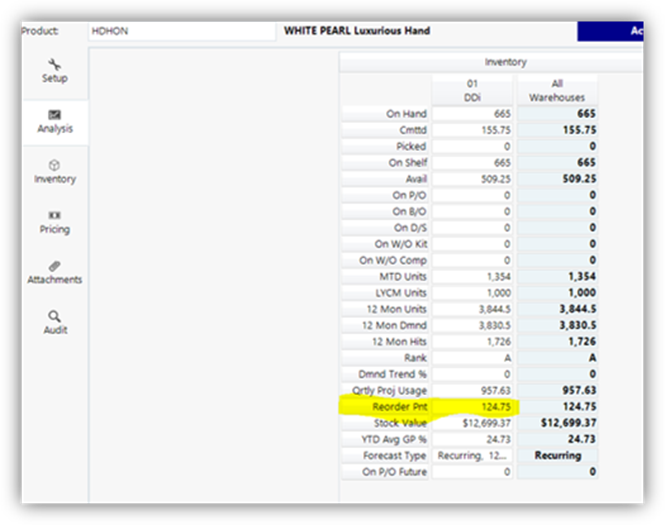
Take a look at the image above. It highlights the ROP value in Inform ERP’s product analysis tab. Our software calculates the ROP across all of your items and warehouses, accommodating to the varying demand at each of those locations. Let’s break down the components that lead us to the ROP value.
- Weekly Demand: Inform ERP takes the weekly demand value, represented by how much of a product you typically sell in a week, and calculates this value to reflect real data from all your warehouses.
- Lead Time (in Weeks): Next it looks at your lead time in weeks. The software looks at the primary vendor of your items and identifies how long it takes for the vendor to deliver the item after placing the order.
- Safety Stock: Lastly, it factors in a safety stock percentage. This acts as a buffer to prevent stockouts due to unexpected spikes in demand. If you don’t set a safety stock amount, Inform ERP defaults to 20% to keep things running smoothly.
As mentioned before, the ROP is used in the Critical Inventory Report. It’s primarily used for showing low stock. If you’re looking at the ROP in the product and it doesn’t look quite right for whatever reason, you can set a minimum stock quantity at the product level. This overrides the stocking threshold so that it is more accurate to what you need it to be.
Part 2 of this series shows how Inform ERP applies the ROP in the Critical Inventory Report. Next, here is how Reorder Quantity (ROQ) works.
Understanding Reorder Quantity (ROQ)
The reorder quantity (ROQ) is the number of units to buy when you place a replenishment order. While Reorder Point (ROP) tells you when you reorder, the Reorder Quantity (ROQ) focuses on how much to reorder. This more proactive approach is managed through Inform ERP’s Projected P/O screen, where it suggests the ideal purchase quantities based on your settings. ROQ helps you plan purchases before you hit low inventory, helping you to avoid a reactive replenishment. It uses the following to calculate the ROQ:
- Formula: Reorder Quantity (ROQ) = Weeks Needed x Weekly Demand
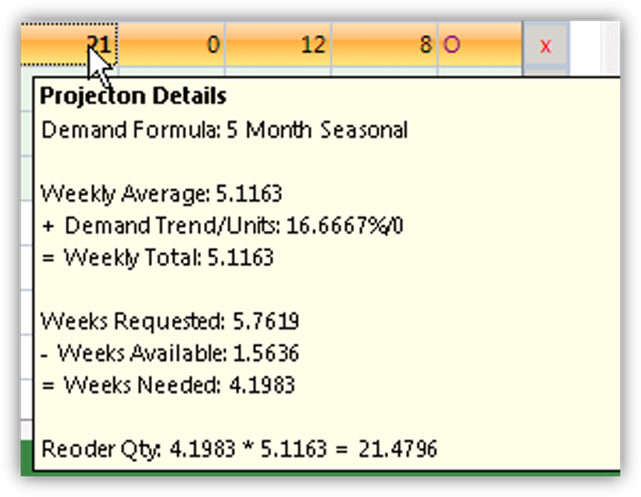
Look at the image above. It shows the Projected P/O screen, where the mouse cursor hovers over the 21. This is the ROQ and what Inform ERP recommends you buy, so let’s try to understand how we got to 21 units of product.
- Weekly Total: The weekly demand is what our weekly average is. It is calculated by the Weekly Average + (Demand Trend/Units).
- In our example, the product sells approximately 5.1 units per week. If we plug in the numbers to the formula, we have 5.1 units + (16.67%/0) = 5.1 units
- Weeks Needed: This is how many weeks’ worth of product we’re requesting. It is based on vendor lead time and turn cycles. The Weeks Needed is calculated by Weeks Requested – Weeks Available
- The example says that we have 5.8 weeks requested of inventory before the next order. If we already have 1.5 weeks of stock on hand, Inform ERP subtracts 5.8 Weeks Requested – 1.5 Weeks Available for a total of 4.2 Weeks Needed.
- ROQ: As stated before, ROQ focuses on how much product we need to order. We’ll use our formula ROQ = Weeks Requested * Weekly Average.
- Our example gave us 4.2 Weeks Needed * 5.1 Weekly Average = 21 units of product we need to order.
This calculation ensures you have just enough stock to need demand until our next order, helping you avoid overstocking or understocking.
Reorder Point vs Reorder Quantity: Key Differences
Today, we covered the key differences between Reorder Point (ROP) and Reorder Quantity (ROQ) in DDI System’s Inform ERP. We learned that ROP is about knowing when to reorder to avoid stockouts, while ROQ focuses on how much to order to meet future demand in an efficient manner. Both ROP and ROQ play a critical role in optimizing your purchasing process. When used effectively, they can help you reduce carrying costs, improve fill rates, and streamline purchasing efforts. Both calculations run inside Inform ERP, DDI System’s distribution ERP software for wholesale distributors, across every item and warehouse.
Next in this series: Exploring Critical Inventory and Projected P/Os to show how Inform ERP’s forecasting tools can further improve your operations.
See how Inform ERP calculates reorder points and reorder quantities across every item and warehouse. Get a demo.