In the fast-paced world of manufacturing, it’s easy to overlook powerful tools hiding in plain sight. That’s why we’re taking a moment to reintroduce you to some of the most useful—but often underused—features of the Virtual Build module in Assembly Planner.
If you’ve ever found yourself toggling between CAD files, BOMs, and libraries—or waiting on updated models before you could even start process planning—Virtual Build already has solutions built in. You just might not be using them yet.
One Workspace, All the Control
Virtual Build lets you work smarter by bringing together everything you need in a single, unified workspace. That means you can include multiple routings and CAD models—perfect for managing sub-assemblies and product variants.
And here’s a reminder worth repeating: CAD files are not required to get started. You can author and edit processes before the latest models are in, helping you stay ahead of engineering delays and production schedules.
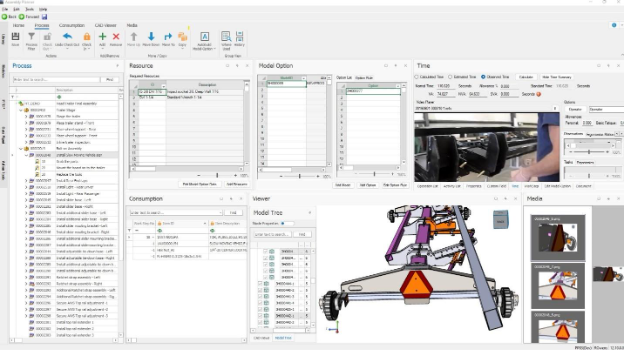
Work Your Way—On One Screen, or Three
You know your workflow best. That’s why we’ve made the Virtual Build interface fully customizable.
- Float panels across multiple monitors.
- Resize, reposition, or layer your views.
- Simultaneously view and edit tasks, tools, and parts in a truly interactive UI.
If your setup is built for multitasking, now your software is too.
Ribbon Menus: More Power, Less Clicks
We introduced MS Office-style ribbon menus to simplify and streamline access to the most-used tools.
📋 Process Ribbon
- Filter workspace rows by model, option, unit, or station.
- Quickly Check-In/Check-Out tasks and operations.
- Move and copy process elements across routings.
- Use Autobuild to smart-map Activities to Models and Options.

Consumption Ribbon
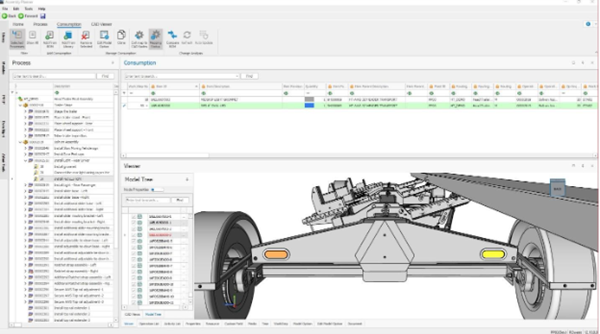
- Consume parts the usual way—from the mBOM or library—with precise CAD node mapping.
- Or go visual: drag and drop directly from the 3D CAD model, and the system handles instance mapping automatically.

CAD and BOM in Sync, Finally
Process planning isn’t just about writing tasks—it’s about making sure every bolt and bracket is accounted for.
That’s why we integrated our powerful BOM Compare tool into Virtual Build. Now, you can:
- Highlight assemblies directly in the 3D model or diff tree.
- Instantly drag parts into Activities or Worksteps.
- Ensure full part consumption—and eliminate last-minute surprises.
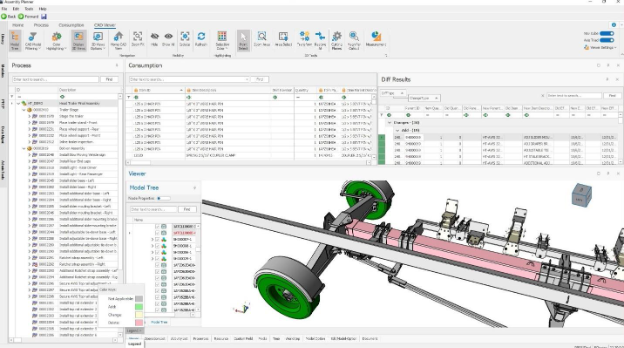
Validate the Build, Virtually
Ever wish you could see your build come together, step by step, before anything hits the shop floor?
Now you can. The CAD Viewer ribbon lets you:
- Filter CAD to show only what’s consumed in a specific task.
- Or view all parts up to a selected step—virtually assembling your product on screen.
- Use color highlighting to spot unconsumed or modified parts and reference the legend for clarity.
Need to call out details? Add magnifiers, cutting planes, measurements, or transform parts as needed.
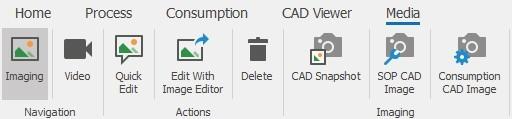
Smarter Image Capture for SOPs and Consumption
Our new Media ribbon menu makes SOP creation and part tracking more visual:
- Snap images from CAD per Activity or Consumption record.
- Use our built-in image editor to annotate directly—no more exporting to PowerPoint or Visio.
- Best of all? You can update images later without redoing all your annotations.
This means your visuals stay synced with your process—and your sanity.
What You’ll Need for Best Results
To make the most of the new Virtual Build:
- Use a dedicated PC with 16GB RAM and a dedicated graphics card.
- Avoid VPNs and remote desktop—they don’t leverage GPU power and will slow you down.
- Use a high-speed network (LAN ≥ 100MB) for best 3D performance and video playback.
Making the Most of Virtual Build
Virtual Build was designed with the realities of modern process planning in mind—balancing complexity, speed, and flexibility. It brings together the tools you need to plan efficiently, even when CAD data is incomplete or changing. The result? Less time spent navigating disconnected systems, and more time focused on building better processes.
Ready to move beyond static work instructions?
Watch our on-demand webinar to see how leading manufacturers are using visual, data-driven tools to improve accuracy, speed, and collaboration.